Uploading files helps with search results! Which is why sharing files is important.
 1.
1. (a) Create a folder, put the files you want to share inside, then go to LW's menu bar, Tools>Options>Sharing & press the Add button, then direct it to where this new folder is & select it. Then press Apply button.
__ (b) See these example images: 1.
Adding Folders to share via Tools>Opions>Sharing (applies to LW 4),
& also 2. Adding folders to share from LW Library (this 2nd option is now obsolete) __ (c)
How to share folders in LimWire version 5:
Adding files/folders to share with LW 5 2. Another helpful tip to help your files be shared & found in searches:
seems like nobody is downloading my music; giving your files good descriptions or tags, be they audio, video, image, documents or program type files.
 3.
3. Enable Chat so people can Browse your files:
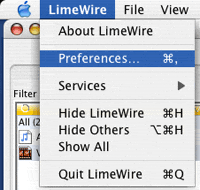
Why should I have Chat enabled if I have no desire to chat? It is to do with Sharing files! With Chat enabled, it helps greatly with sharing even if chat is not desired Mac OSX preference options is normal location for most OSX programs, keyboard shortcut is Command-Comma ⌘ ,