Previewing/playing audio and video files directly from the incomplete folder will not create extra preview files on your HDD as happens if previewing from the LW download window.
(LW 4 users see half way down this post.)
LW 5 you will need to right-click the download file from Download window & choose
Locate on Disk. From the incomplete folder the file will be selected, simply open it. Incomplete files should be at least 5% downloaded, 10% better since downloading of the data is not necessarily in sequential order & parts of the beginning, middle & end only might have downloaded, so you can pan through to check. Sample image showing what to do below to check incomplete files (without creating Preview files.)
____Another alternative to Preview Files in LW 5 (without creating preview files) is go to Library, find the file that says
Filename (Downloading), right-click on it & choose
Locate on Disk, then open the file as it will already be highlighted.
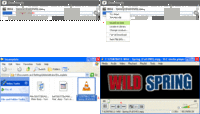 <- (click thumbnail to see larger view)
Older LW 5.3 & earlier version & alternative method to
Locate File on Disk ->
 LW 4 users:
 To stop the creation of Preview files being created in the incomplete folder when you use the Preview function. Instead, go to the LimeWire Library window,
(1) select the incomplete folder
_ (ii) (click the Name bar so the arrow is pointing upward so it's in alphabetical order for ease of finding, unless you think arranging by size is easier then click that heading bar, or whichever manner is easiest to find the file),
_ (2) Find the file you wish to preview in the incomplete list & select it,
_ (3) Press the Launch button.
An alternative method is go to the Library window, select incomplete folder, press Explore button which will open the folder on your desktop (it may take you to the level up, so double-click on incomplete folder on the desktop to open the folder). Set to view in List/
Details mode. Arrange the folder by date modified. You should find the file you wish to preview near the very top. Double-click the incomplete video file to open, else right-click the file & choose open with whichever video player you prefer. (see first technique example image below.)
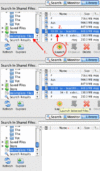 (click thumbnail to see larger view)
Here is an example for the second method of launching an incomplete file, this time from an open folder on your desktop (this example is Mac OSX but same principle applies to both Windows & Linux):
 (click thumbnail to see larger view) .