
|
| |||||||
| Register | FAQ | The Twelve Commandments | Members List | Calendar | Arcade | Find the Best VPN | Today's Posts | Search |
| Connection Problems Problems getting the LimeWire or WireShare program connecting to the Gnutella network.
(not about connecting to files, that is a Download/Upload Problems section issue.) Please supply system details as described in the forum rules.
Start here Suggestions to help you get connected, * try here first *, then see below (click on 'this' blue link) Did you FORGET something BEFORE you posted? If you post in this section you MUST provide these details: System details - help us to help you (click on 'this' blue link), else do not be surprised if your posting is ignored :) |
 |
| | LinkBack | Thread Tools | Display Modes |
 June 27th, 2008
| |||
| |||
 New Version doesn't connect New Version doesn't connect I have been using Limewire with the existing computer, OS, ISP, and all firewall, anti-virus settings. Nothing has changed except I downloaded and installed Limewire V 4.18.3. Now I can only get one bar in the bottom left corner and there doesn't appear to be any upload/download data exchange. No connection in essence. I'm not sure what to do. I've checked everything I know to make sure no programs are interfering, including the firewall. Can I go back to the previous version when life with Limewire was good? Thanks a bunch, Robert Computer and program data: OS version: Windows XP Professional Firewall: Zone Alarm Pro Ram: 960 Hard Disk space available: 49g Connection type: Cable Modem & router brand name & model numbers: Linsys Wireless router Connect from: House LimeWire: 4.18.3 ISP: Time-Warner Using your browser go here: http://www3.limewire.com:6346/ The page should say 'Your test worked!'. What happens when you go there?: the test worked This a new problem with an experienced user.  |
|
June 27th, 2008
| ||||
| ||||
| Try the fixes here: If LW Will Not Connect Deleting the preferences folder often fixes connection probs that start after upudating LW  |
|
June 27th, 2008
| |||
| |||
| mine didnt work - cant search because still connecting to network - Its just the settings in limewire tools - options - luckily I had another laptop that does worked and copied them! cant put them all here but ones i changed were - remove tick from show license warning - advanced - set firewall to manual and entered 37294 as port then put setting back to use pnp - proxy = no proxy (empty any proxy address and port to 0 (zero) - network interface = all boxes empty - file *** = dot in always take selected ***.. tick in torrent and magnetic - performance = all 3 boxes ticked this worked after close limewire and reopen immediately for me good luck Dave |
|
June 27th, 2008
| |||
| |||
| ps *** a s s (as in association) this was ver 4.18.3 update Dave |
|
June 27th, 2008
| |||
| |||
 Problems with connection v4.17 and 4.18 Problems with connection v4.17 and 4.18 Robert I'm glad to join to LM community. I'm from Mexico city. I had the same problem by using v4.17 past yesterday (June 24) and I decided to download the new v4.18: same result .. nothing. I could not go in to Limewire (bars al time in red color and the globe with the brick wall means firewall is activated). I always worked with the globe an wall in that condition but now the bar never go out from red. I checked the LM setting and were ok (I guess) and also my Norton (by checking Exclusions) but ..... I don't know what's going on. It's funny 'cause if I go connections it seems is working. I think the problem is LM is not able to share the folder. Regards Quote:
|
|
June 27th, 2008
| |||
| |||
| solved! Dave I just replace the gnutella.net file and it works!! You have only go to docum & settings, username, .limewire, delete the currently gnutella.net file, download a new one by locating in same subfolder (it's very important) and re-connect or re-start!! These steps were from 'birdy' Regards Close LW. Make sure that it’s properly closed by opening Task Manager (ctrl+alt+del) & click on the Processes tab. If there’s a LW process running, end the process. The link below will take you to a file hosting site where you can download a file named gnutella.net. zSHARE - gnutella.net If that link doesn't work, try this other one. gnutella.net Download that file & save it to your computer. Remember where you've saved the file to. If you're using XP, look below. Go to Control Panel > Folder Options > click on the View tab > put a dot in the circle next to ‘show hidden files and folders’ > apply > ok. Go to Start > click on My Computer > double click on Documents and Settings > double click on the folder with your username > double click on Application Data. Now look for a folder named LimeWire. This folder named LimeWire is your preferences folder. You need to open the LimeWire folder by double clicking on it. 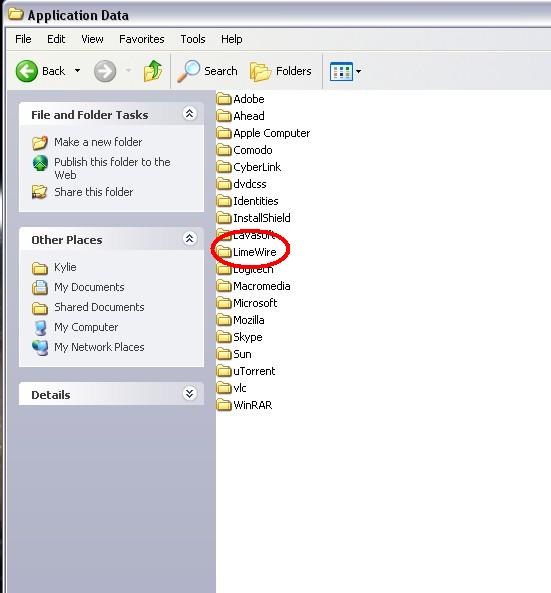 Once you’ve opened the LimeWire folder, look for a file named gnutella.net (or it may be named gnutella). 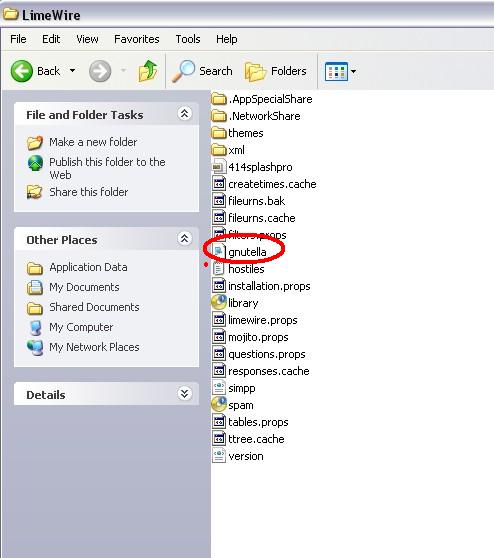 Delete that file. Leave the LimeWire folder open. If there’s no file named gnutella.net or gnutella, don’t panic...you can put one into the folder. Go & find the gnutella.net file that you downloaded earlier. Copy that gnutella.net file & paste it into the open LimeWire folder. Close all folders, restart your computer & then start LW. Quote:
|
|
| |


 Linear Mode


