
|
|
|||||||
| Register | FAQ | The Twelve Commandments | Members List | Find the Best VPN | Today's Posts | Search |
| Download/Upload Problems Problems with downloading or uploading files through the Gnutella network. * Please specify whether the file problem is a Gnutella network shared file OR a Torrent file. * |
 |
|
|
Thread Tools | Display Modes |
|
#1
 May 27th, 2008
|
|||
|
|||
 downloads NEVER progress!!!!!
i'm trying to download 5 AVI videos ( 4 of them 350MB and 1 of them 700MB). im quite confused and surprised that after 6 hours online, the downloads did not progress even a bit. 21% meant 21% after 6 hours..
 1 file however was detected corrupt by limewire and a message pop out saying Limewire has detected corruption in *****.avi. do you want LW to continue the download? if clicked YES and it resumed, faster than ever. within 1.5 hours, it was complete! i think LW was getting rid of the so called corrupt data. anyway to make LW ignore the corrpt files? 1 file however was detected corrupt by limewire and a message pop out saying Limewire has detected corruption in *****.avi. do you want LW to continue the download? if clicked YES and it resumed, faster than ever. within 1.5 hours, it was complete! i think LW was getting rid of the so called corrupt data. anyway to make LW ignore the corrpt files?BTW, the *corrupt* file played perfectly with video and audio on my DivX Player. 
|
|
#2
May 27th, 2008
|
||||
|
||||

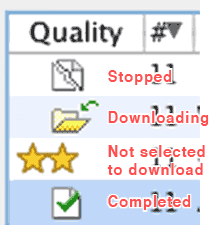
Re-search the file for more sources, & choose Get More Results. This will help find fresh sources. Another trick is if you see the file in the search results but it's not continuing, then cancel the download & reselect from search results. But be sure it is the same file. The 2nd icon in the sample image below.
|
|
#3
May 27th, 2008
|
|||
|
|||
|
it works, but..
it works but.. only for 1%. previously was 21% now 22% but then went back to 21% then goes back to 22 then back to 21 then to 22...why happening? tried re downloading from the search list the ripped paper icon from the quality column.
|
|
#4
May 28th, 2008
|
||||
|
||||
|
Quote:
I heard it's best to delete your LW prefs folder after updating to most recent version, that in itself "might" be playing a part; Try deleting your LW Preferences folder whilst LW is closed; instructions here: Point #2 & 3 in Fixes for Limewire (sample image included at bottom of page.) or http://www.gnutellaforums.com/genera...der-vista.html
|
|
#5
June 1st, 2008
|
|||
|
|||
|
okay.. tried ALL of the 3 steps but did not work...
so what I did was i uninstalled Limewire and deleted eveything that got to do with Limewire and then i reinstalled and now, the downloads complete within 2 hours, @ 150K/s.. So happy!!
|
|
#6
June 2nd, 2008
|
|||
|
|||
|
Quote:
http://www.gnutellaforums.com/downlo...tml#post319067 Last edited by Lord of the Rings; June 3rd, 2008 at 05:03 AM. Reason: Added in link to where she found her fix
|
|
#7
August 29th, 2008
|
||||
|
||||
|
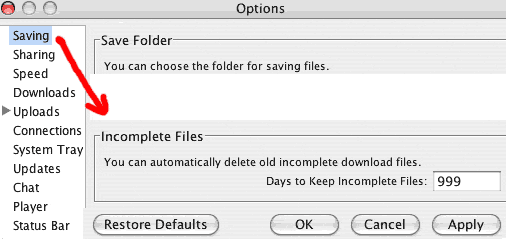
Double check how long you have your incomplete files to keep for. If the incompletes are older than you have set to keep them for then they may have gone stale.
|
|
|
|
 Similar Threads
|
||||
| Thread | Thread Starter | Forum | Replies | Last Post |
| Downloads wont progress | robba31 | Download/Upload Problems | 4 | June 4th, 2008 02:43 AM |
| Downloads queued, won't progress | DayleVS | Download/Upload Problems | 4 | November 9th, 2006 02:04 PM |
| I cant even SEE my downloads in progress....... | bigbadjosh | Download/Upload Problems | 1 | July 23rd, 2005 08:55 AM |
| progress of downloads | xanaxbaby | Open Discussion topics | 1 | September 12th, 2004 12:55 AM |
| progress lost on downloads | gigglez_0 | Download/Upload Problems | 5 | September 1st, 2004 09:46 PM |


 Linear Mode

