
|
| |||||||
| Register | FAQ | The Twelve Commandments | Members List | Calendar | Arcade | Find the Best VPN | Today's Posts | Search |
| General Vista, Windows 7 or later Support Concerns all issues with using LimeWire or WireShare in the Vista and Windows 7, 8 or 10 operating system |
 |
| | LinkBack | Thread Tools | Display Modes |
 October 1st, 2007
| |||
| |||
 New Vista user - LimeWire does not connect - Help ? New Vista user - LimeWire does not connect - Help ? Hey everyone, I recently got a new laptop which uses Vista. My old one used XP, and now i cant connect to the limewire network and search for files, but b4 i could. I am using the same modem. Can anyone help??   |
|
October 1st, 2007
| ||||
| ||||
 Please give us your details. System details - help us to help you (click here) |
|
October 1st, 2007
| |||
| |||
 1. OS version? vista home premium 2. What firewalls you have? windows, AVG free fome edition 3. How much ram? 1014MB 4. Hard Disk space available? 78.4 Gig 5. Connection type? cable wireless 6. Modem & router brand name & model numbers? router motorola model SBG900i - au. modem Toshiba modem 7. Where are you trying to connect from? unit 8. What version of LimeWire (LW) & Java do you have? 4.14.10 , java 1.6.0_02 9. Who is your ISP telstra bigpond 10. Do this simple test for us. Using your browser go here: http://www3.limewire.com:6346/ The page should say 'Your test worked!'. What happens when you go there? page can not be displayed 11. Are you sharing the connection with other computers or p2p sharing programs? If yes, please give details of set up. no jusat one computer 12. Is this a your 1st try at LW or is this a new problem with an experienced user. No it use to work with my old computer using XP with the same router adn the same ISP account 13. Do you see a brick wall in front of the blue world icon at the bottom of LW's interface? yes http://www.gnutellaforums.com/attach...1&d=1158099342 14. For those using a modem/router, how is your modem/router set up...are you port forwarding or is UPnP enabled? im not sure 15. What security programs are you using (antivirus etc)? Some people might not be aware that their security suite includes a firewall AVG free edtion  16. What country are you living in? Australia Like i said it worked fine on my old laptop using XP with the same ISP and the same modem, but not on here |
|
October 1st, 2007
| ||||
| ||||
| Some people have had connection probs with that latest Java, try this version instead. Download the JRE offline installer & remove any other Java versions before you install this one. Archive: Download Java 2 Platform Standard Edition (J2SE) 5.0 Update 11 If that doesn't help, delete LW's preferences folder when LW's properly closed. See point 3 here & also point 2 if you've used older versions of LW in the past (there could be a folder in either location). Fixes for LimeWire This will kill all of your settings within options, you'll have to go back through afterwards & reset things. If you're not sure of your settings, go through LW's tools > options & write them all down, so that you can reset things later. Looks like the port test page is acting up, try that again later on tonight or even tomorrow & see if the page can be displayed. Did you see the firewall icon when you used LW on your XP machine? Try port forwarding, the instructions are here (for SBG900, pages are probably the same for your model). Port Forwarding for the Motorola SBG 900 Don't forget to set up a static IP address. LW's listening port, port in the 'manual port forward' box & port forwarded within the router should all be the same number. |
|
October 2nd, 2007
| ||||
| ||||
| Quote:
When you click on the blue Java link, then click on 'Download JRE'...you'll be sent to the download page. There, you'll see that there are 2 Windows versions of JRE available for download. The top one is the offline installation (15.80 MB), the bottom one is the online installation (245.76 KB). 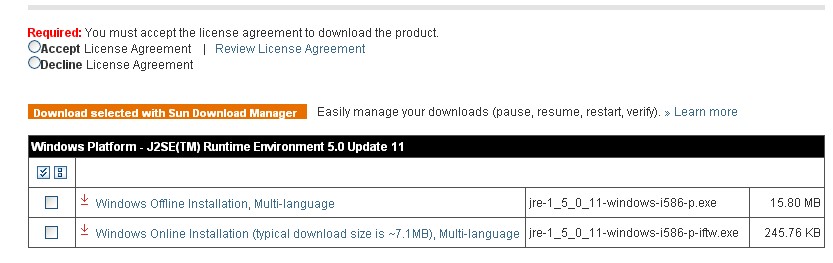 Put a tick next to the offline installation & download that one. Don't forget to accept the license agreement first. |
|
October 2nd, 2007
| ||||
| ||||
| Download the 1.5.0_11 installer, then remove your current Java version(s), then install 1.5.0_11. Are you sure that you're trying to download the offline installer? Try only having your browser open (don't have other programs open) when you download that installer. Or try using a different browser. |
|
| |


 Linear Mode


