
|
|
|||||||
| Register | FAQ | The Twelve Commandments | Members List | Find the Best VPN | Today's Posts | Search |
| Welcome to the Gnutella Forums and introduce yourself A place to introduce yourself to the forums (don't tell your identity) and say hello |
 |
|
|
Thread Tools | Display Modes |
|
#1
 October 9th, 2009
|
|||
|
|||
 limewire disk problem
I have a file that keeps reappearing on Limewire startup. Its a disk problem 100% complete file. How does one get rid of it? I have searched for the file reloaded limewire an it still reappears on startup.

|
|
#2
October 9th, 2009
|
||||
|
||||
|
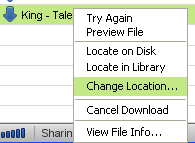
From memory this generally suggests your drive/partition is nearly full. Right-click the file in the LW download window & choose a different download location for it; a different partition or hard disk drive. You 'might' need to restart LW for the file's change in status, I'm not sure.
|
|
|
|
 Similar Threads
|
||||
| Thread | Thread Starter | Forum | Replies | Last Post |
| Limewire Pro Disk Problem for Max OS X | dermeister07 | General Mac OSX Support | 8 | November 10th, 2008 06:12 PM |
| Limewire says "Disk Problem" after download, but disk ok. | LFinestone | Download/Upload Problems | 6 | June 18th, 2008 08:44 AM |
| Download Problem (disk problem) | lime6443 | Download/Upload Problems | 5 | March 25th, 2008 01:14 PM |
| I need help with Limewire (disk problem) | BryanB617 | Download/Upload Problems | 0 | June 18th, 2007 07:36 AM |
| Download problem(Disk Problem) | kevoz | Download/Upload Problems | 0 | December 22nd, 2005 03:00 PM |


 Linear Mode

