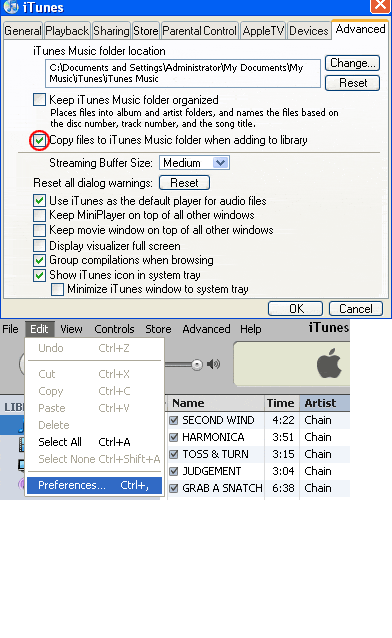
Go to iTunes menu bar, Edit menu -> Preferences -> Advanced & see what your iTunes importing location is. Do you have the option clicked to
Copy files to iTunes Music folder when adding to Library ? It is safest if you have it checked for yes.
('Keep iTunes Music Folder Organised', was once a good option, however the new iTunes auto adds numbers (previously optional) to the song file each time you adjust it & may end up with a file titled, 03 03 03 03 (title) which is ridiculous. Other problems also involved with this now buggy 'Keep ... folder organised' function.)
 (image of Missing Songs)
!
(image of Missing Songs)
! means iTunes is unable to find the file. O.o
_ The files need to be properly added to iTunes music folder before they can be transfered to iPod.
Some people get confused with the LimeWire playlist they see in iTunes and think the actual files have been transfered to iTunes. That's not the case, a playlist is simply a document that points the player to where the songs are, in this case the LW download folder.
Your Downloads location. (If you set up a custom location to download music files to, go to LW's menu bar, Tools > Options > Saving & see which directory location it shows.)
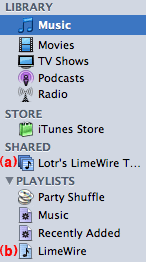 (a)
(a) Is a shared Library for iTunes. It simply shows the LW download folder where the song files are. This playlist can be shared over a LAN network.
(b) The LW Playlist is simply a playlist which points iTunes to where to find the songs to play them to check them before
adding to iTunes. This playlist cannot be burnt, only played. These songs are not within the iTunes Music folder. In order to do that, see below.

Do NOT delete any music files until you have properly ADDED them to the iTunes Music library, please follow instructions carefully, it's not difficult.
 There is a number of ways you can get the songs into iTunes library:
* LimeWire 5 can automatically add files to your iTunes now
There is a number of ways you can get the songs into iTunes library:
* LimeWire 5 can automatically add files to your iTunes now. In LW go Tools > Options > My Files. Scroll down to iTunes section & click
Configure button. Tick the box to automatically add files to iTunes > click ok. Now when you finish a download, iTunes will open & you'll see the new file being added. Once the files are in your iTunes, you can add them to playlists or transfer them to your iPod. This option is now equivalent to how the process has worked for Mac OSX users for many years. See sample image here for LW 5
(click to see attachment):

Note: The auto-adding of songs to iTunes 'might' stop working after a long or busy session of using LW. Answer is to go to options, disable iTunes option, press apply button, then enable it again (you may need to exit options window & return before enabling it again). This should fix it. If not, restart both LW & iTunes.
To add music files
manually to iTunes, see below:
* A 1st iTunes File menu > Add to Library... & select the songs to add. Hold SHIFT key for selecting multiple songs.
* B Drag & drop the songs onto iTunes Library icon above the playlists. This can be via your Saved Files or Shared folders or directly via LW's Library window, though this may depend on version of LW you are using.
* C Create a Playlist within LW. Save it with a unique name & as an m3u file. Then import that playlist into iTunes. Then go to iTunes menu >Advanced>Consolidate Library. This will copy the actual files to iTunes own library folders.
* D Launch your new songs from LW's Library>Saved Files folder whilst iTunes is your default player. Once iTunes opens it will copy the songs to its music library. But make sure LW's media player is disabled & also, iTunes menu>Preferences>Advanced &
'Copy files to iTunes Music folder when adding to library' option is ticked! LW's menu bar>Tools>Options>Player & uncheck option to enable LW's media player.
Setting default audio program
Also see these -
iTunes Tutorial: iTunes Tutorial
iPod Tutorial: http://www.apple.com/support/ipod/tutorial/index.html (see bottom of post#14 below for video tutorials.)
(* Don't get confused if you see the
LimeWire playlist in iTunes. It is simply a playlist which can be played but not copied or burnt & the song files still exist in your LW download folder. So follow the instructions here to properly add them to iTunes Library.)
* A The most obvious way to add files to your iTunes Music Folder directly is via using the Control & O keys. Hold down the SHIFT key to select more than one file at once; the example shows how to add via the Add control & select multiple files at one time.
 (click to see larger view)
.
(click to see larger view)
.