![]() |
| |||||||
| Register | FAQ | The Twelve Commandments | Members List | Calendar | Arcade | Find the Best VPN | Search | Today's Posts | Mark Forums Read |
| Download/Upload Problems Problems with downloading or uploading files through the Gnutella network. * Please specify whether the file problem is a Gnutella network shared file OR a Torrent file. * |
![]() |
| | LinkBack | Thread Tools | Display Modes |
| |
| |||
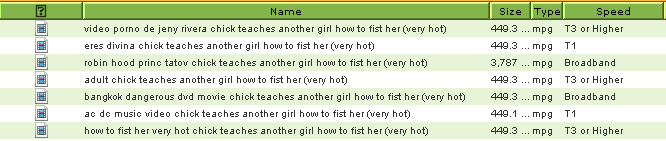
| Why is it no matter what I search for this ****ing file always pops up? [IMG]file:///C:/DOCUME%7E1/Kyle/LOCALS%7E1/Temp/moz-screenshot.jpg[/IMG][img=http://img440.imageshack.us/img440/9099/41855922bx6.png] [img=http://img440.imageshack.us/img440/41855922bx6.png/1/w666.png] Literally, you can search for ANYTHING and this will still pop up Try it yourself, it never fails, it's like a virus or something. ![]() Last edited by Lord of the Rings; November 13th, 2008 at 12:15 AM. Reason: Re-added image from censored image (forum censors) |


| ||||
| Yes ! And way out is to filter certain words in your keyword filter. Also ignore various file sizes. Here is a recent similar thread question & answer: http://www.gnutellaforums.com/new-fe...gasms-all.html ![]() From your examples, I'd suggest widen your Size column slightly. You cannot see whether the size is KB or MB which makes a big difference. ![]() 1,000 KB = 1 MB ... most music is around 2,000 KB -> 5,000 KB (2-5 MB or a little larger for some longer & larger bit rate songs) For movies, check Movie download issues (click on blue link) for some tips on size to look for & using Bitzi look up to check validity of the file. Last edited by Lord of the Rings; November 13th, 2008 at 12:18 AM. |
![]() |
| Thread Tools | |
| Display Modes | |
| |