
|
|
|||||||
| Register | FAQ | The Twelve Commandments | Members List | Calendar | Arcade | Find the Best VPN | Search | Today's Posts | Mark Forums Read |
| General Discussion For anything which doesn't fit somewhere else (for PHEX users) |
 |
|
|
Thread Tools | Display Modes |
|
#1
 December 23rd, 2008
|
|||
|
|||
 can't find the default folder
where is aplication data folder?
can't find where the downloaded files and incomplete files are and how to set them in my library? 
|
|
#2
December 23rd, 2008
|
||||
|
||||
|
Application Data folder is a 'Hidden' folder. You need to turn on Show All Files & Folders in your computer's view options.
To set download & incomplete folder locations: Menu bar, Settings -> Directories. To set Share folders: Library window, bottom left corner you will see an Add Folder button. If you have sub-folders within any of those folders you do not wish to share, right-click & choose Hide folder, else select & press Hide folder at bottom left corner.  To open these folders, right-click & choose Explore button to take you to & open up the folder onto the desktop. 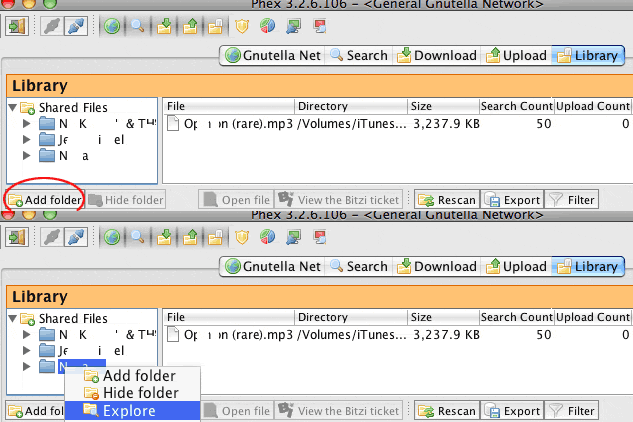 . Last edited by Lord of the Rings; December 23rd, 2008 at 07:53 PM.
|
|
| Thread Tools | |
| Display Modes | |
|
|


 Linear Mode

