
|
|
|||||||
| Register | FAQ | The Twelve Commandments | Members List | Calendar | Arcade | Find the Best VPN | Today's Posts | Search |
| General Mac OSX Support For general issues regarding Mac OS X users |
 |
|
|
Thread Tools | Display Modes |
|
#1
 August 3rd, 2008
|
|||
|
|||
 mac question(LW starts automatically when i boot up)
I am new to the mac format. LW starts up automatically when I turn the mac on but I wouyld prefer to start it myself. I do not see a tool bar or menu that I can go into on LW to change the setting. I would also like to designate which folder I want my music to download to but once again cannot find the tool bar to do such. (I can do it on my pc but not the mac)


|
|
#2
August 3rd, 2008
|
||||
|
||||
|
Hold down the Command (Apple icon) key & comma at same time (⌘ ,) which is the keyboard shortcut on most OSX programs to access the preference settings.
 For LW preferences settings you can access them manually by clicking under the LW icon next to the apple icon, see image below. 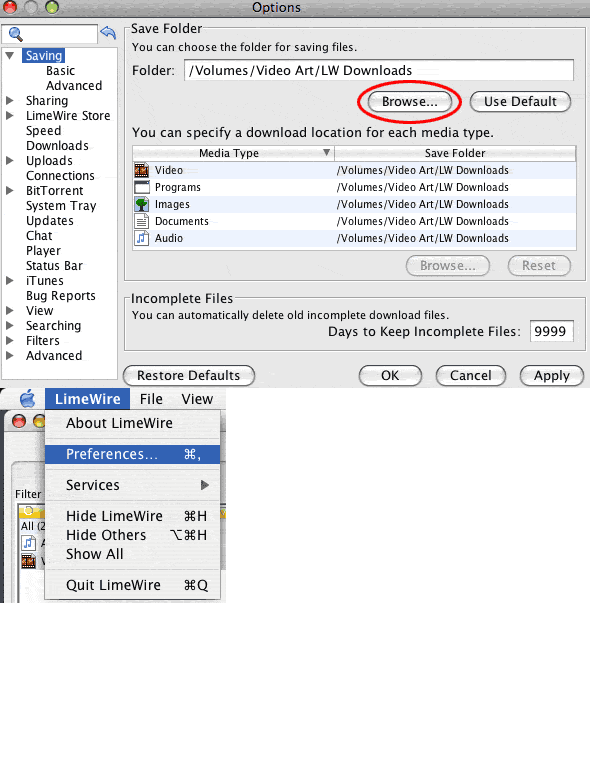 To change download location, click first tab on LW preferences window; 'Saving'. Press Browse button. In my example image above, I chose a different hard disk drive, since I don't like using the system drive to save and process my personal files to. (If interested, can also see How to Change download location (click on link) (specific for folders / media types) But saving different media types to different locations is not recommended for new users.) Then Click Advanced tab, then click on System Startup (last option) & uncheck the option, press apply button. This will stop LW starting up when the computer boots up.  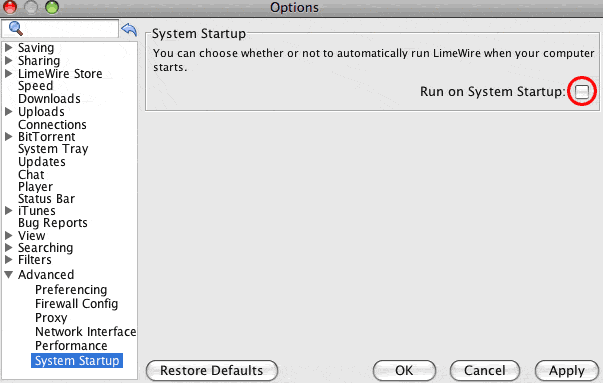
Last edited by Lord of the Rings; August 3rd, 2008 at 09:23 PM.
|
|
|
|


 Linear Mode

