
|
|
|||||||
| Register | FAQ | The Twelve Commandments | Members List | Find the Best VPN | Today's Posts | Search |
| General Windows Support For questions about Windows issues regarding LimeWire or WireShare or related questions |
 |
|
|
Thread Tools | Display Modes |
|
#1
 June 17th, 2006
|
|||
|
|||
 Limewire in taskbar
How can I have the limewire icon in my taskbar? The one with the "Start" button. On the right of that. It used to have that but I took it off, but I don't know how to put it back on. Thanks.

|
|
#3
June 17th, 2006
|
|||
|
|||
|
Umm, dude, when I go to that Options bar, I don't see "System Tray". All I see is:
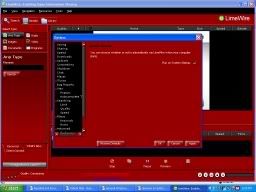 Sorry for the small picture.
|
|
|
|
 Similar Threads
|
||||
| Thread | Thread Starter | Forum | Replies | Last Post |
| lw taskbar residue | washout | General Windows Support | 3 | February 14th, 2007 02:47 AM |
| icon in taskbar won 't go | Josey | Windows | 7 | August 21st, 2005 04:53 PM |
| Help! Limewire stuck on taskbar, can't open! | daemon749 | Windows | 3 | August 5th, 2005 07:17 PM |
| Limewire won't open..it just stays in the taskbar | tanluv | General Windows Support | 1 | November 27th, 2004 05:17 AM |
| Icon in Taskbar | Ross90 | General Windows Support | 2 | September 2nd, 2002 10:26 AM |


 Linear Mode

