
|
|
|||||||
| Register | FAQ | The Twelve Commandments | Members List | Find the Best VPN | Today's Posts | Search |
| Getting Started Using LimeWire + WireShare Tips on getting started with LimeWire or WireShare. Also a place to seek help getting started. Includes the original LimeWire Pirate Edition thread, with the most up to date LPE installer packages on the internet including File_Girl's LPE version, and WireShare the most upgraded version of them all. |
 |
|
|
Thread Tools | Display Modes |
|
#261
 October 6th, 2012
|
||||
|
||||

Check your Java control panel to be sure Java 6 is active/enabled and Java 7 is either removed or disabled.
Edit: I forgot you are using Windows XP. In that case Java 7 must be totally removed from the system or else LW 5 will give that same error. You can use the Add/Remove Programs Control Panel to remove Java 7. If you wish to keep Java 7 then you will need to create a shortcut to the LW.jar file in the LW program library folder: http://www.gnutellaforums.com/connec...tml#post368753 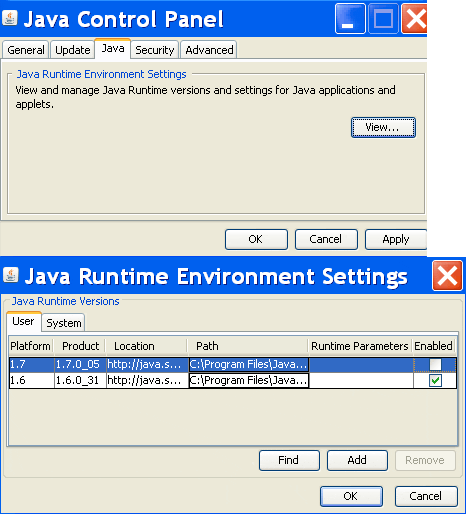 Yeah a bit of short-sightedness by the LW devs on the Java issue. 
|
|
#262
October 7th, 2012
|
|||
|
|||
|
No, I'm using Windows 7, laptop. My mother still have her XP, for now, but soon it's time for an upgrade to 7.
|
|
#263
October 7th, 2012
|
||||
|
||||
|
My apologies for not being accurate for earlier instructions then if using XP, and misreading your response. NVM.
But if needed, to delete the LW prefs folder for XP see http://www.gnutellaforums.com/window...tml#post183932 though the sample image may have been from Win 2000. Maybe time for her to upgrade to a mac. joking  Best wishes for your mother. Best wishes for your mother.  BTW only LW 5 versions are affected by the Java 7 issue.
|
|
#264
October 9th, 2012
|
|||
|
|||
|
I tried but I got as far as "AppData". I clicked to show folder and apply but there wasn't any Appdate showing up or anything saying "Roaming". Am I missing something?
|
|
#265
October 10th, 2012
|
||||
|
||||
|
Quote:
Anyhow, try this for finding the preferences folder... Win 7: Click on the start button. Now type %appdata% into the text field. Hit the 'enter' button. Do you see a folder named LimeWire listed? If so, that's your preferences folder. Win XP: Click on Start > Run > Type %appdata% into the text field. Hit the 'enter' button. Do you see a folder named LimeWire listed? If so, that's your preferences folder.
|
|
#266
October 10th, 2012
|
||||
|
||||
|
Depends whether you are on Windows 7 or XP. Only Vista and Windows 7 have a Roaming folder.
Windows 7 is C:\Documents and Settings\*yourusername*\AppData\Roaming\Limewire Windows XP is C:\Documents and Settings\*yourusername*\Application Data\limewire If you are not seeing AppData / Application Data folder then it means you have not properly enabled viewing hidden files and folders in the View option settings. Another trick is Click on "Start" and click on "Run", now copy and paste this code here: %APPDATA% Then click "OK" That will take you inside the Application Data folder where you should see the LW folder if using Windows XP. Or for Windows 7 simply copy it into the search box in the Start menu. Or alternatively for Windows 7 copy this into the Start menu %APPDATA%\ with the backslash on the end then press enter. Win 7 example: Oops timing, I bumped my head as Birdy jumped in front of me to reply lol. Birdy and LOTR were taken to the nearest hospital for a cup of coffee.
|
|
#267
October 10th, 2012
|
||||
|
||||
|
Quote:
 I didn't mean to jump in front of you I didn't mean to jump in front of you 
|
|
#268
October 10th, 2012
|
|||
|
|||
|
Quote:
|
|
#270
October 13th, 2012
|
||||
|
||||
|
Quote:
Post #5 here http://www.gnutellaforums.com/window...tml#post183932 explains how to back-up incomplete downloads if you have any. But after deleting your LW settings files you will need to reset your downloads location first time you open LW again. What are all the files in the preferences folder? There is the downloads file as mentioned above which records details of your incomplete downloads. There is a library file that details both all files you have in your library and those files you are sharing. There is a props file that records general settings such as your download location, contains blocked hosts and search terms, connection history. This props file is maybe the most common file to become corrupted and zeroed. Not sure about the others. There is the gnutella file which is the file that helps you connect. There is a xml folder that contains specific details about your library files. There is a fileurns file that seems to detail shared files specifics and locations. Probably the largest of all the items will be the browser folder. This is disposable as LW will create a new one next time it is opened. Your Library in LW will probably be empty when you open LW. You can always re-add files to your Library via drag and dropping the files from your LW download folder.
|
|
|
|
 Similar Threads
|
||||
| Thread | Thread Starter | Forum | Replies | Last Post |
| LimeWire Pirate Edition not connecting? | Lord of the Rings | Connection Problems | 36 | January 15th, 2017 01:05 AM |
| Limewire 5.6.2(pirate edition) and java 1.7 | brightshadow | Connection Problems | 106 | August 28th, 2013 02:46 PM |
| Limewire pirate edition issues | kpunkin | Welcome to the Gnutella Forums and introduce yourself | 1 | December 9th, 2010 11:15 PM |


 Linear Mode

