
|
|
|||||||
| Register | FAQ | The Twelve Commandments | Members List | Calendar | Arcade | Find the Best VPN | Today's Posts | Search |
| Getting Started Using LimeWire + WireShare Tips on getting started with LimeWire or WireShare. Also a place to seek help getting started. Includes the original LimeWire Pirate Edition thread, with the most up to date LPE installer packages on the internet including File_Girl's LPE version, and WireShare the most upgraded version of them all. |
 |
|
|
Thread Tools | Display Modes |
|
#1
 February 18th, 2009
|
||||
|
||||
 Using LimeWire 5 to find your files on your computer using 'Locate File on Disk' tool
You wish to access your files directly on your computer? Find the files listed in any of the Library, P2P Network or Upload windows & right-click (OSX use Control-click) & choose Locate File on Disk option from the pop-up menu which appears. The folder will open up & the file in question will be highlighted. Example image shown below is Mac OSX, however same principle applies to Liinux & Windows users.
 For those seeking incomplete files, right-click the file & choose View File Info ... from the pop-up menu. In the Information window, click on the Locate File on Disk option & the incomplete folder will open up with the incomplete file in question highlighted. 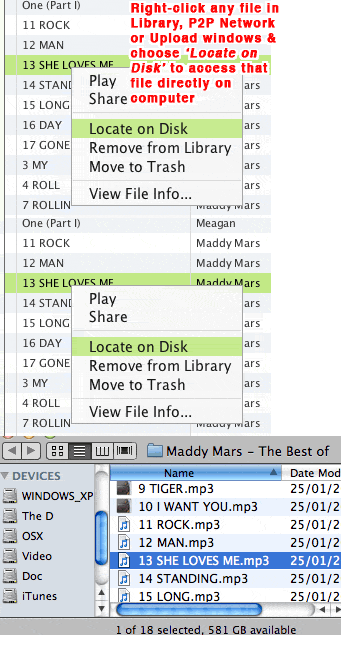 . Last edited by Lord of the Rings; March 16th, 2009 at 08:00 PM. |
|
|
|


 Linear Mode

