
|
|
|||||||
| Register | FAQ | The Twelve Commandments | Members List | Find the Best VPN | Today's Posts | Search |
| Mac OSX Problems with installing LimeWire or WireShare for Mac OSX users |
 |
|
|
Thread Tools | Display Modes |
|
#1
 June 7th, 2008
|
|||
|
|||
 bonehead query (can't open zip files)
i have tried to dowlnload zips of needed items but can not ppen.. i have tried to investigate but am getting nowhere.. can anyone help me so i can download a mac program i need in a dang zip file??
how do i open?!!!! thanks from a dense user... 
|
|
#2
June 7th, 2008
|
||||
|
||||
|
Double clicking should work. If not, select the zip file, go to File menu & choose Open with ... Archive Utility or BomArchiveHelper & it should open.
Do this in the finder, NOT within LW. For fast & easy access, go to your LW Library window, select Saved Files folder & press the Explore button. Sample image here: Using Library Explore button to access downld folder (click on link) & the folder will open up for you.
|
|
#3
June 14th, 2008
|
|||
|
|||
|
I have the same problem with my mac. i have no problem with music but programs are a diff story. ALSO PROGRAMS IN written in MP3 wont open ......tiger 768ram 80 gig hd
|
|
#4
June 15th, 2008
|
||||
|
||||
|
The programs that are mp3 are viruses. O.o
There's a few utilities you can use to open ZIP's on a mac. One being Mac's own archive helper as the image below shows. Stuffit Explander can be handy too. Some zips might be corrupted, or pc viruses. Obviously a program is going to be larger than 5 MB (5,000 KB) in most cases.  Opening a zip should normally be as easy as selecting it & Command (apple) key & O for open. But do NOT try to open ZIP's from within LW. Keyboard shortcut: ⌘ O Opening a zip should normally be as easy as selecting it & Command (apple) key & O for open. But do NOT try to open ZIP's from within LW. Keyboard shortcut: ⌘ O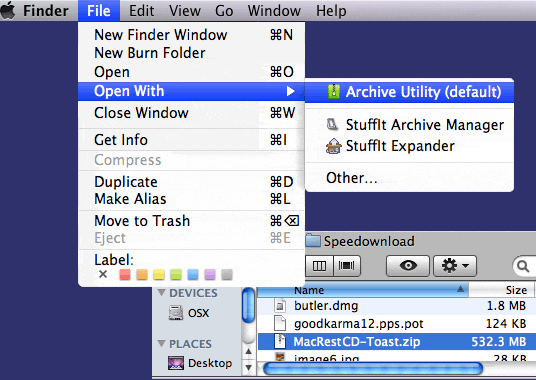
|
|
|
|
 Similar Threads
|
||||
| Thread | Thread Starter | Forum | Replies | Last Post |
| Why does it tell me can not open input files for slittet files? | jayna24 | General Vista, Windows 7 or later Support | 1 | October 26th, 2009 03:34 PM |
| Error Message (Could not open files to Splittet. files) | toopay | General Vista, Windows 7 or later Support | 1 | April 10th, 2009 05:23 PM |
| can't open files | laura62 | Tips & Tricks | 1 | September 13th, 2005 01:14 PM |
| Writing Java client.. how should I implement query/query hits? | Tw|st3r | General Gnutella Development Discussion | 1 | December 26th, 2004 11:03 PM |
| Open rar files | raul0 | Tips & Tricks | 4 | October 13th, 2004 10:45 AM |


 Linear Mode

