
|
|
|||||||
| Register | FAQ | The Twelve Commandments | Members List | Find the Best VPN | Today's Posts | Search |
| Open Discussion topics Discuss the time of day, whatever you want to. This is the hangout area. If you have LimeWire problems, post them here too. |
 |
|
|
Thread Tools | Display Modes |
|
#1
 March 1st, 2005
|
|||
|
|||
 video preview
I know I have seen somewhere about using of players to preview
downloads while in progress (avi) apprarently WMP won't. Whats a good player that will allow me to do that and also since you can't drag the file how do you get it to the player you want to use 
|
|
#2
March 1st, 2005
|
||||
|
||||

VLC has in-built codecs & divX also plays avi files. For links see: VLC media player - Overview (choose nearest mirror site) OR
Class not registered/Codecs - Gnutella Forums To make an application default for particular type of file, select it (outside of LW), go to menu File>Properties>Change Open with ... & choose the program (eg: VLC) & choose always open with. Press OK, Apply & OK. In the example below my system thought all my video files were WinAmp. Doh!  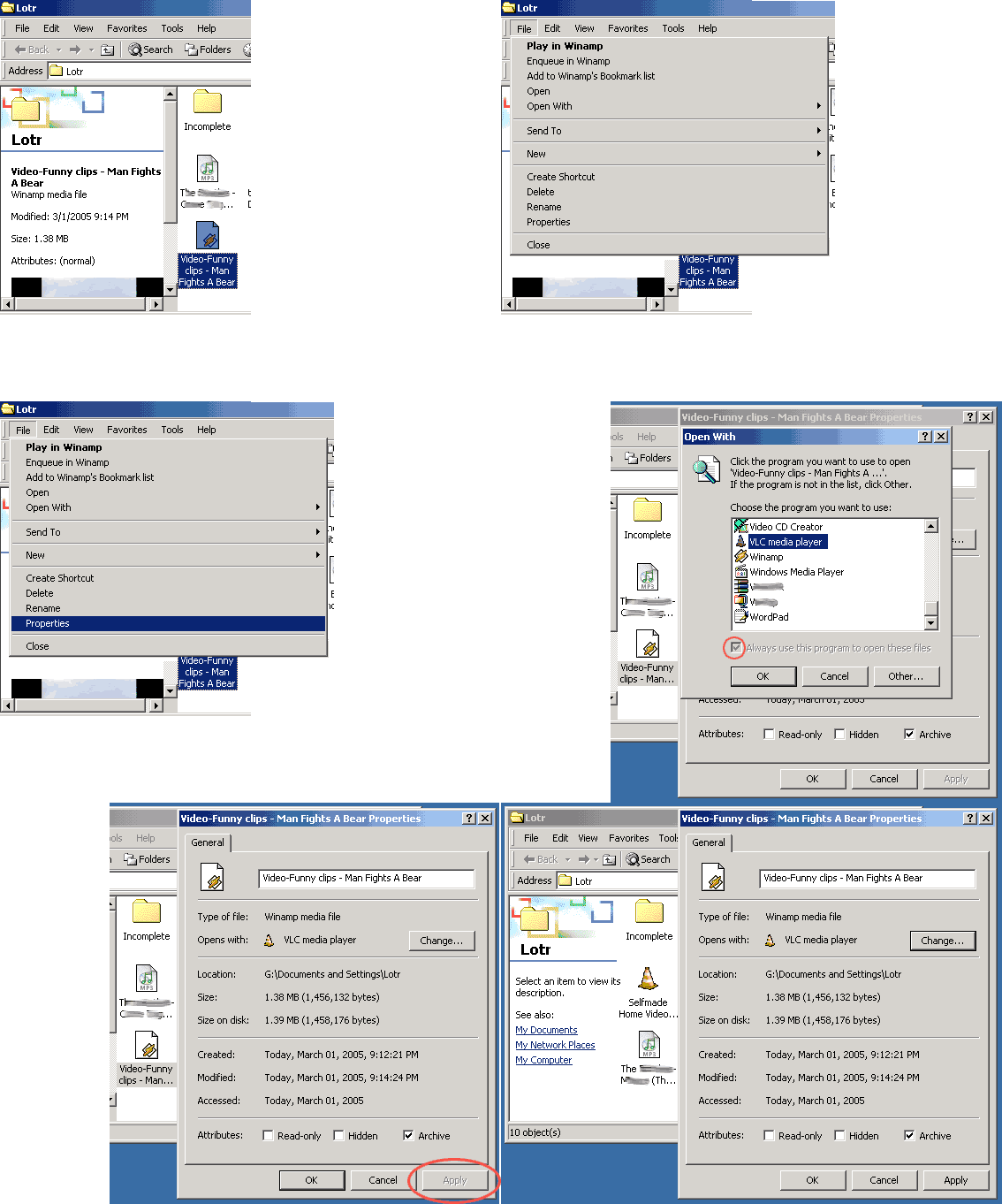
Last edited by Lord of the Rings; May 27th, 2008 at 11:52 PM.
|
|
#3
March 4th, 2005
|
||||
|
||||
|
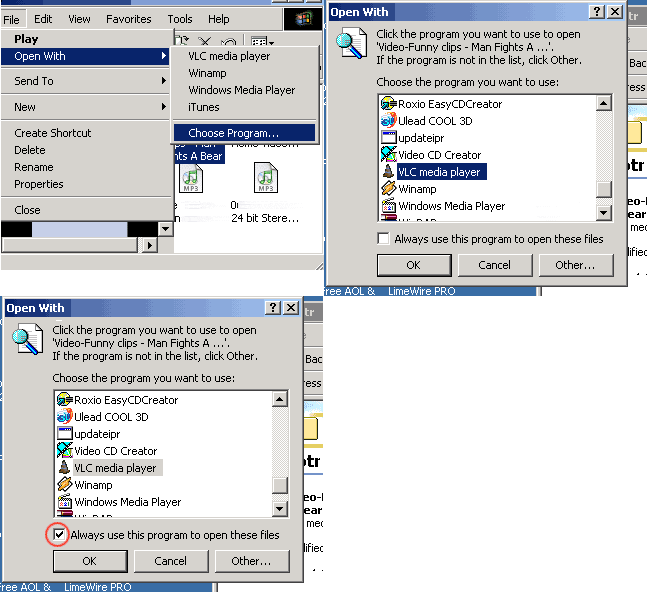
I've decided to offer another option similar to above. By the way I believe the technique might be a little different for XP.
Last edited by Lord of the Rings; May 27th, 2008 at 11:53 PM.
|
|
#4
March 5th, 2005
|
|||
|
|||

Thanks for the info Ive downloaded VLN I haven't had alot of time lately to experiment but I was able to play a couple of files just to get a little feel about the player now I'm in the process of trying to decide on a good mp3 player I really appreciate your support you guys and gals @ limewire are the greatest
|
|
#5
March 5th, 2005
|
||||
|
||||
|
Quote:
__________________
iMac G4 OSX 10.3.9 RAM 256MB LW 4.10.5 Basic ADSL anything from 3 to 8Mbps/around 1024kbps "Raise your can of Beer on high And seal your fate forever Our best years have passed us by The Golden Age Of Leather" -Blue Öyster Cult-
|
|
#6
March 8th, 2005
|
||||
|
||||
|
Any problems with icons & their default apps despite making changes like above then see:
Other options: 1. http://support.microsoft.com/kb/q132668/ 2. http://www.easydesksoftware.com/news/news12.htm
|
|
#7
March 21st, 2005
|
|||
|
|||
|
but i have macintosh (an imac computer) so i dont have a menu and i went to file and couldn't find properties what do i do.
|
|
#8
March 21st, 2005
|
||||
|
||||
|
For a start you should probably be posting in the General mac or OSX section. This post is very obviously only concerned with windows. I have posted similar answers for mac os9 & osx! More than once. So do a search of the forums or search thru those sections, & if you can't find such an answer then create a new thread in those sections suggested.
|
|
#9
March 21st, 2005
|
|||
|
|||
|
THANKS!!!!!!!!!!!!!!!!
|
|
#10
October 5th, 2005
|
|||
|
|||
|
mp3 player
quintessential is a great mp3 player. beats real n winamp bigtime. windows media player is not worth comparing to, it sux. quintessential plays lot of other formats as well, may require plug-ins occasionally [reqd plugin for mp4 files]. it also plays video usin divx, but like lotr said, VLC is the best for video.
|
|
|
|
 Similar Threads
|
||||
| Thread | Thread Starter | Forum | Replies | Last Post |
| video will not preview | lowrider | Download/Upload Problems | 2 | November 9th, 2006 12:33 PM |
| Video Preview | chewwie | Download/Upload Problems | 4 | August 29th, 2006 02:56 AM |
| No Video preview how do i make my preview wmp again?? | Seth_151 | General Windows Support | 1 | August 14th, 2006 12:03 PM |
| How do I launch or preview a video file without creating a preview file | Blue as in the mirror | Open Discussion topics | 1 | July 19th, 2006 11:55 AM |
| Preview a video! | cnico88 | General Windows Support | 4 | March 13th, 2005 09:51 PM |


 Linear Mode

