
|
|
|||||||
| Register | FAQ | The Twelve Commandments | Members List | Calendar | Arcade | Find the Best VPN | Today's Posts | Search |
| Open Discussion topics Discuss the time of day, whatever you want to. This is the hangout area. If you have LimeWire problems, post them here too. |
 |
|
|
Thread Tools | Display Modes |
|
#1
 January 19th, 2005
|
|||
|
|||
 How to transfer music to my iPod
How do I transfer my Limewire music to my iPod. I have iTunes installed on this computer.
thanks for all replies Paul Clark |
|
#2
January 20th, 2005
|
|||
|
|||
|
Transfewr to IPod
thanks for your message Peerless...but unfortunately there was no other response ...hate to sound dumb ..but what blue bar in the upper right ??? I opened the open forum widow..went to my message and no response other than yours
could you be more specific please...much appreciated Paul |
|
#3
January 20th, 2005
|
|||
|
|||
|
u go to i tunes>file>move folder 2 libery then u slect the folder ur songs that u downloaded r in and click ok
|
|
#4
January 22nd, 2005
|
|||
|
|||
|
thanks for the reply Silver...for some reason I can't get the songs saved while in Limewire to transfer to iTunes.
I click on the shared file...then save as ...name the file...click OK..but I can't find the file when I repoen My Music for example. I would appreciate the steps to get the file saved then transfered MUCH appreciated Paul |
|
#6
January 23rd, 2005
|
|||
|
|||
|
Transfering music to an iPod.
thanks for the reply Harty...not sure I understood your answer though...I have the songs in a Limewire Library...my problem is getting them saved in some file...then getting them transfered to my iPod library.
I go to shared files...then click "open as" ...name the file with in MY Music directory ...limewirw1 for example...click OK...when I try to reopen the directory there is no limewire file. Got any thoughts thanks again Paul |
|
#7
January 24th, 2005
|
||||
|
||||
|
Go to iTunes menu bar, Edit menu -> Preferences -> Advanced & see what your iTunes importing location is. Do you have the option clicked to Copy files to iTunes Music folder when adding to Library ? It is safest if you have it checked for yes. ('Keep iTunes Music Folder Organised', was once a good option, however the new iTunes auto adds numbers (previously optional) to the song file each time you adjust it & may end up with a file titled, 03 03 03 03 (title) which is ridiculous. Other problems also involved with this now buggy 'Keep ... folder organised' function.)
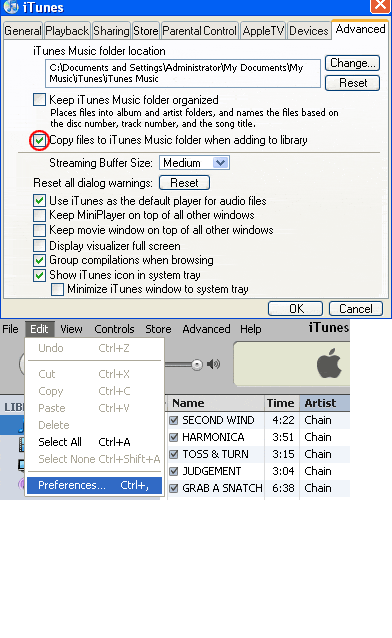 ! means iTunes is unable to find the file. O.o _ The files need to be properly added to iTunes music folder before they can be transfered to iPod. Some people get confused with the LimeWire playlist they see in iTunes and think the actual files have been transfered to iTunes. That's not the case, a playlist is simply a document that points the player to where the songs are, in this case the LW download folder. Your Downloads location. (If you set up a custom location to download music files to, go to LW's menu bar, Tools > Options > Saving & see which directory location it shows.) 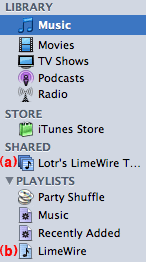 (a) Is a shared Library for iTunes. It simply shows the LW download folder where the song files are. This playlist can be shared over a LAN network. (b) The LW Playlist is simply a playlist which points iTunes to where to find the songs to play them to check them before adding to iTunes. This playlist cannot be burnt, only played. These songs are not within the iTunes Music folder. In order to do that, see below.  Do NOT delete any music files until you have properly ADDED them to the iTunes Music library, please follow instructions carefully, it's not difficult. Do NOT delete any music files until you have properly ADDED them to the iTunes Music library, please follow instructions carefully, it's not difficult.  There is a number of ways you can get the songs into iTunes library: * LimeWire 5 can automatically add files to your iTunes now. In LW go Tools > Options > My Files. Scroll down to iTunes section & click Configure button. Tick the box to automatically add files to iTunes > click ok. Now when you finish a download, iTunes will open & you'll see the new file being added. Once the files are in your iTunes, you can add them to playlists or transfer them to your iPod. This option is now equivalent to how the process has worked for Mac OSX users for many years. See sample image here for LW 5 (click to see attachment): Note: The auto-adding of songs to iTunes 'might' stop working after a long or busy session of using LW. Answer is to go to options, disable iTunes option, press apply button, then enable it again (you may need to exit options window & return before enabling it again). This should fix it. If not, restart both LW & iTunes. To add music files manually to iTunes, see below: * A 1st iTunes File menu > Add to Library... & select the songs to add. Hold SHIFT key for selecting multiple songs. * B Drag & drop the songs onto iTunes Library icon above the playlists. This can be via your Saved Files or Shared folders or directly via LW's Library window, though this may depend on version of LW you are using. * C Create a Playlist within LW. Save it with a unique name & as an m3u file. Then import that playlist into iTunes. Then go to iTunes menu >Advanced>Consolidate Library. This will copy the actual files to iTunes own library folders. * D Launch your new songs from LW's Library>Saved Files folder whilst iTunes is your default player. Once iTunes opens it will copy the songs to its music library. But make sure LW's media player is disabled & also, iTunes menu>Preferences>Advanced & 'Copy files to iTunes Music folder when adding to library' option is ticked! LW's menu bar>Tools>Options>Player & uncheck option to enable LW's media player. Setting default audio program Also see these - iTunes Tutorial: iTunes Tutorial iPod Tutorial: http://www.apple.com/support/ipod/tutorial/index.html (see bottom of post#14 below for video tutorials.) (* Don't get confused if you see the LimeWire playlist in iTunes. It is simply a playlist which can be played but not copied or burnt & the song files still exist in your LW download folder. So follow the instructions here to properly add them to iTunes Library.) * A The most obvious way to add files to your iTunes Music Folder directly is via using the Control & O keys. Hold down the SHIFT key to select more than one file at once; the example shows how to add via the Add control & select multiple files at one time. . Last edited by Lord of the Rings; May 19th, 2010 at 12:06 AM. |
|
#8
January 24th, 2005
|
||||
|
||||
|
* B 1. For LW 5: Select the audio file in the LW Library via clicking on that tab, then selecting that file in the list. Right-click the file & choose Locate on Disk & it will take you directly to the file. You can then drag & drop from there onto iTunes Music Library icon on top left side of iTunes window.
(If using LW 5, see Using LimeWire 5 to find your files on your computer using 'Locate File on Disk', however in LW 5 you can set in Option settings to allow iTunes to automatically import songs into its music library.) For LW 4: You can select Saved Files folder in LW & press Explore button & the folder will open up for you. Then you can drag & drop songs from there to iTunes 'Library' icon above the playlists. Select multiple files at once by holding down the SHIFT key as you select them. * This is by far the best & most efficient technique of adding music files to iTunes. If music files will not add to iTunes as shown, then they have either been previously added, else the files are fakes/corrupt. But be aware iTunes can only import mp3 & m4a/mp4 files. iTunes cannot import wma (it can convert wma files), real player files, mp3pro, flac or ape files. iTunes can only import Ogg Vorbis files 'if' a 3rd party plug-in is installed. Last edited by Lord of the Rings; May 29th, 2010 at 09:01 AM. |
|
#9
January 24th, 2005
|
||||
|
||||
|
* B 2. Whilst you can drag & drop songs from the desktop to iTunes, you can also drag & drop them directly from LW's Library window. _ (click image below to see larger view) __ (* Warning: this technique may not work properly with some LW 4 versions. But does need to be done from the correctly chosen folder.)
With LW 5, you will not see any drag animation however the iTunes Music Library icons will highlight blue once you have dragged the files to it. Using LW 5: Last edited by Lord of the Rings; May 29th, 2010 at 08:56 AM. Reason: Updated for LW 5 |
|
#10
January 24th, 2005
|
||||
|
||||
|
Unless somebody wishes to correct me, Adding a folder to iTunes also requires consolidation.
(click image to see larger view) Note: this is an older iTunes option which may no longer apply. Last edited by Lord of the Rings; June 11th, 2010 at 07:30 PM. |
|
|
|
 Similar Threads
|
||||
| Thread | Thread Starter | Forum | Replies | Last Post |
| ipod reverse music transfer | pinkminigal | Tips & Tricks | 18 | January 2nd, 2010 06:27 PM |
| Cannot transfer my limewire library to itunes or ipod... | Taylor Davis | Tips & Tricks | 21 | March 28th, 2009 06:23 AM |
| transfer music to iPod shuffle | annie p | Download/Upload Problems | 0 | May 28th, 2005 12:27 PM |
| How to transfer music to my iPod (& iTunes) | Paul Clark | Tips & Tricks | 24 | March 27th, 2005 01:35 PM |
| How to Transfer Music to iTunes & iPod, & using Limewire's Playlists | Lord of the Rings | General Windows Support | 0 | February 24th, 2005 10:54 AM |


 Linear Mode

