
|
|
|||||||
| Register | FAQ | The Twelve Commandments | Members List | Find the Best VPN | Today's Posts | Search |
| Mac OSX Problems with installing LimeWire or WireShare for Mac OSX users |
 |
|
|
Thread Tools | Display Modes |
|
#1
 March 7th, 2009
|
|||
|
|||
 Nothing Happening After Running Installer
What can i do to fix this as i rerun the installer and nothing new appears.
Do i need another update first? What can i do to get my limewire back!! Thanks in advance 
|
|
#2
March 7th, 2009
|
||||
|
||||
|
Go to menu bar, under the GO menu, select Applications. Then look for LimeWire folder inside there. When you find it, open the folder, double-click the program to open it.
 Once it's open, control-click the LW icon in the Dock & choose to keep in Dock. That's where you will find it in future. Once it's open, control-click the LW icon in the Dock & choose to keep in Dock. That's where you will find it in future. BTW a keyboard shortcut to access your Applications folder is Command-SHIFT-A keys at same time. Command key is the one with an apple icon or the one that shows below. ⌘ SHIFT A
|
|
#3
March 8th, 2009
|
|||
|
|||
|
thanks thats helped but in my limewire folder the limewire icon is not their it has a big see through circle with a line through it.
when i click on this it says "You cannot open the application LimeWire because the Classic environment is no longer supported" Any more help guys?
|
|
#4
March 8th, 2009
|
||||
|
||||
|
is your computer a 64 bit intel machine? if not then it's not compatible with LW 5. Best to downgrade to LW 4.18 Lime Wire » Download Out-Of-Date Installers If problems installing then remove install limewire.pkg from receipts folder in library.
Receipts folder sample image
|
|
#5
March 8th, 2009
|
|||
|
|||
|
I am not sure i am using the an imac Mac OS X 10.5.6 With a 2.8Ghz Intel Core 2 Duo processor
Is the processor my main problem?
|
|
#6
March 8th, 2009
|
|||
|
|||
|
I have reinstalled the older version of limewire but would like the newer updated version could you tell me how to check to see if it is a 64 bit ... whatever the things called...
Thanks in advance nd for all your help so far
|
|
#7
March 8th, 2009
|
||||
|
||||
|
Easiest way to know is go to Java preferences & see if Java 1.6 (6) is listed. If it is, move it up the hierarchy; Setting up Java for Leopard. Java 6 only runs on 64-bit machines.
|
|
#8
March 15th, 2009
|
|||
|
|||
|
Your help has been brilliant so far thanks very much
I now have done it all have all the requirements but for some reason when i open the limewire folder in my applications the limewire image is not their it is a see through circle through some documents. When i try to open this it comes up saying "You can't open the appliation "LimeWire" because the Classic environment is no longer supported" any ideas what i can do?
|
|
#9
March 15th, 2009
|
||||
|
||||
|
I've seen that reported before. Either means you have accidentally downloaded the OS 9 Classic installer v.4.0.x or your computer does not support Java 6. To check, go to Java's preferences & see if Java 1.6(6) is listed. If Java 6 is listed, move it to the top of list. Setting up Java for Leopard. Keep in mind LimeWire 5 only runs with Java 1.6. If you do not have Java 1.6 then use the appropriate operating system version for your system: Lime Wire » Download Out-Of-Date Installers but do not choose the bottom one on list which is the Classic OS 9 one. Image below is choices for old versions, the top one being 4.18.8
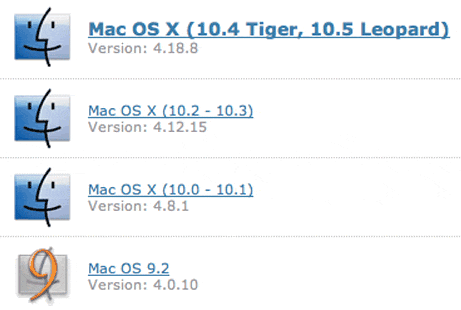 Below is typical error received when attempting to run an OS 9 installer or program (the cross through the program icon means it cannot be opened):  . Last edited by Lord of the Rings; March 15th, 2009 at 09:04 PM.
|
|
#10
March 18th, 2009
|
|||
|
|||
|
Right i definitely have the correct Java and i am definitely downloading the correct installer but the same problem is happening...
any ideas?
|
|
|
|
 Similar Threads
|
||||
| Thread | Thread Starter | Forum | Replies | Last Post |
| isn't happening | griffn | Connection Problems | 10 | January 1st, 2008 09:15 AM |
| What's happening..? | GiovanniZotti | Open Discussion topics | 1 | January 20th, 2007 08:17 AM |
| nothing is happening!!! | pinman72 | General Windows Support | 4 | November 23rd, 2005 11:28 PM |
| "running installer" but nothing happens | Unregistered | Mactella (Macintosh) | 0 | June 26th, 2001 09:39 AM |


 Linear Mode

