Gnutella Forums  

Go Back   Gnutella Forums > Current Gnutella Client Forums > LimeWire+WireShare (Cross-platform) > Open Discussion topics
Register FAQ The Twelve Commandments Members List Calendar Arcade Find the Best VPN Search Today's Posts Mark Forums Read

Open Discussion topics Discuss the time of day, whatever you want to. This is the hangout area. If you have LimeWire problems, post them here too.


Reply
 
LinkBack Thread Tools Display Modes
  #1 (permalink)  
Old August 3rd, 2010
Lord of the Rings's Avatar
ContraBanned
 
Join Date: June 30th, 2004
Location: Middle of the ocean apparently (middle earth)
Posts: 685
Lord of the Rings has a distinguished reputationLord of the Rings has a distinguished reputationLord of the Rings has a distinguished reputation
Default

This if for LW 5 only:

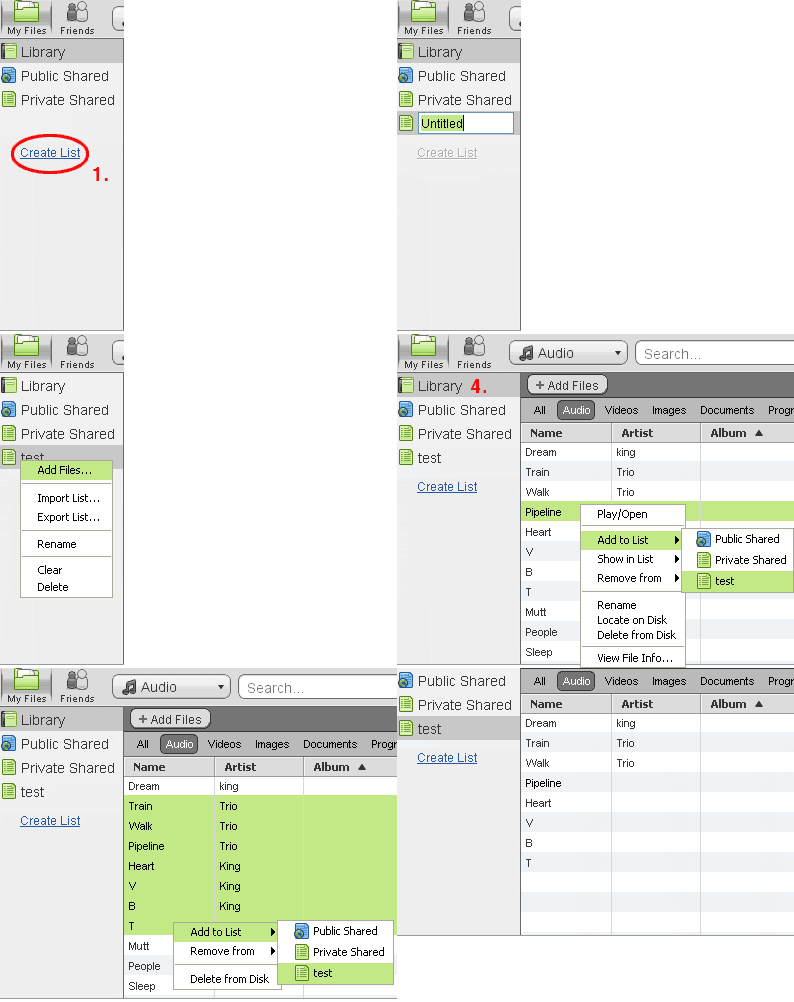
Drag file(s) from Library to the playlist icon. It does not give visual impression of being dragged but the file will become listed in the playlist if you drag it to the list icon.
Alternatively, right-click the file in Library & choose Add to List. You need to have created a List first of course. Sample image below shows different options. #3 of sample image shows right-clicking the actual playlist. In #4 in sample image, you could of course drag & drop to the List icon instead from the Library. In #5 of sample is showing choosing multiple files. #6 of sample image is the playlist. Playlists can be audio or video.
How do I "enqueue" songs like in OLD limewire?-playlist-lw-5.gif (click to see sample image)
Reply With Quote
Reply

Thread Tools
Display Modes

Posting Rules
You may not post new threads
You may not post replies
You may not post attachments
You may not edit your posts

BB code is On
Smilies are On
[IMG] code is On
HTML code is Off
Trackbacks are On
Pingbacks are On
Refbacks are On


All times are GMT -7. The time now is 07:53 AM.


Powered by vBulletin® Version 3.8.7
Copyright ©2000 - 2026, vBulletin Solutions, Inc.
SEO by vBSEO 3.6.0 ©2011, Crawlability, Inc.

Copyright © 2020 Gnutella Forums.
All Rights Reserved.