
July 12th, 2023
|
 | ContraBanned | | Join Date: June 30th, 2004 Location: Middle of the ocean apparently (middle earth)
Posts: 685
| |
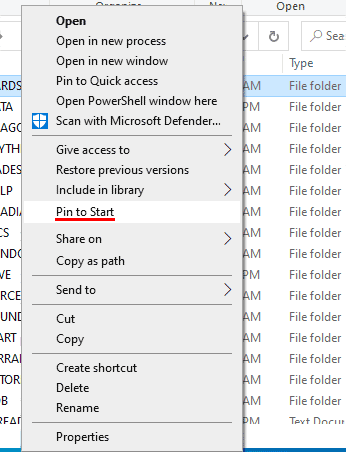
If the shortcut has the same name as the item you are attempting to open, be it a file or folder, then use Window 10's search function using that name (minus any reference to shortcut.) After locating, instead of creating a new shortcut for it you can Right-click the file or folder and choose Pin to Start. Thereafter the file or folder will appear in the Start menu.  (click to enlargen image) (click to enlargen image)
There's also the Pin to Quick access option instead of pin to Start. |


 (click to enlargen image)


 1Likes


 Threaded Mode


