
|
|
|||||||
| Register | FAQ | The Twelve Commandments | Members List | Find the Best VPN | Today's Posts | Search |
| Connection Problems Problems getting the LimeWire or WireShare program connecting to the Gnutella network.
(not about connecting to files, that is a Download/Upload Problems section issue.) Please supply system details as described in the forum rules.
Start here Suggestions to help you get connected, * try here first *, then see below (click on 'this' blue link) Did you FORGET something BEFORE you posted? If you post in this section you MUST provide these details: System details - help us to help you (click on 'this' blue link), else do not be surprised if your posting is ignored :) |
 |
|
|
Thread Tools | Display Modes |
|
#391
 October 25th, 2004
|
||||
|
||||

Your username? For the Limewire forums?
... Didn't you just use it to post? Limewire (the application) doesn't use usernames yet and if you're talking about the email adress you used when dlding Pro (if you got Pro, that is), then I suggest you just try out every email adress you have.
__________________
iMac G4 OSX 10.3.9 RAM 256MB LW 4.10.5 Basic ADSL anything from 3 to 8Mbps/around 1024kbps "Raise your can of Beer on high And seal your fate forever Our best years have passed us by The Golden Age Of Leather" -Blue Öyster Cult- 
|
|
#392
October 25th, 2004
|
|||
|
|||
|
OSX user...can't connect worth anything! :'(
Hey all...I've been reading the possible fixes for the connect probs and I have tried them all and nothing! I'm so frustrated!
I'm using mac OSX version 10.3.5 I can open it and it has the lil green bar that constantly says 'connecting' occassionaly it will go up to 'poor' for like a second then back down to 'connecting' although obviously i never can do anything. I've tried deleting preferences, unchecking tips, etc. etc. and gone into system prefs making sure the port was available thruogh the firewall. I dunno...I need some serious help! If anyone knowing bout this prob. on mac osx could shed some light on this i'd greatly appreciate it!!! thanks!
|
|
#393
October 26th, 2004
|
|||
|
|||
 lost...
a little lost, i've got all these limewireOSX.zip folders on my mac's destop. i also have an incomplete folder w/ downloads.dat file in it; also there's a limewireOSX.zip.sit.si file on my desktop, the forums are a little confusing, i also put my credit card # in thinking that i was paying for 2 yrs of limewire when my friend told me it's free, i've been reading for past hour; just can't get it to work, what does gnutella mean anyway?
|
|
#394
October 26th, 2004
|
||||
|
||||
|
If you paid for 2 years then you've been scammed. See: http://www.gnutellaforums.com/showth...threadid=28751 There's only one place you should have got your LW from & that's http://www.limewire.com/english/content/home.shtml The pro version costs $18.88 & offers 6 mths of free updates to the pro version & customer support. There's no dramatic differences b/w the pro & standard free version. There's no reminder to upgrade to pro when you open LW & there's some other minor improvements in the pro version. Traditionally the pro version enabled you to be able to connect to more ultrapeers & have better connection quality than standard LW.
Gnutella is the name of the p2p network. I don't know why the heck you have zip files. That is not ordinary. Where did you get them? The incomplete folder will have 2 files called downloads.dat & downloads.bak. These 2 files contain your dwnld history & records of your incomplete dwnlds. Leave these files as they are. Once a file has completed dwnlding (100%), LW will 'move' it from the incomplete folder to your LW Dwnld folder (See LW's Prefs-Saving to know where the LW dwnld folder is.) So what is your LW version & which OSX version do you have? Have you updated your java? If you have a problem, please specify in detail what happens from the moment you click to open LW. Also supply as many details as possible about your comp configuration.
|
|
#395
October 26th, 2004
|
|||
|
|||
|
oh please help
I too have tried all suggestions and have as of 10-25 reformatted for other reasons. After setting up anew I downloaded LW, installed (it gave me the latest Java) and now, after trying all suggestions am stumped. After starting LW, it just sits and tries to connect. Occasionally I am graced w/a "poor", but that much like my dreams and aspirations is fleeting..
|
|
#396
October 26th, 2004
|
|||
|
|||
|
Oops!
I sit and view the connections and watch it scroll through hundreds if not thousands of IPs...tried to force, but it doesn't connect...this is insane!!!!!
|
|
#397
October 27th, 2004
|
|||
|
|||
|
Limewirepro had worked great for me until I reformatted my pc, I went from xp home with sp1 to xp pro with sp2. At this point getting limewire to connect has been more like pulling teeth than using a program. I have tried every suggestion I have ran across on this forum and nothing seemed to work for connecting. Sometimes by random chance like maybe one out of 50 tries it connects to at least fair. I am curious if a netgear router could be part of the problem but I was using the same router before I reformatted. I also just tried telling limewire that I had a modem instead of dsl (even though I have dsl) and it has connected to turbo charged after a few minutes, this might be one of those random times but I am not disconnecting just yet to check.
|
|
#398
October 27th, 2004
|
|||
|
|||
|
your "quick" fix did NOT work...
|
|
#399
October 27th, 2004
|
||||
|
||||
|
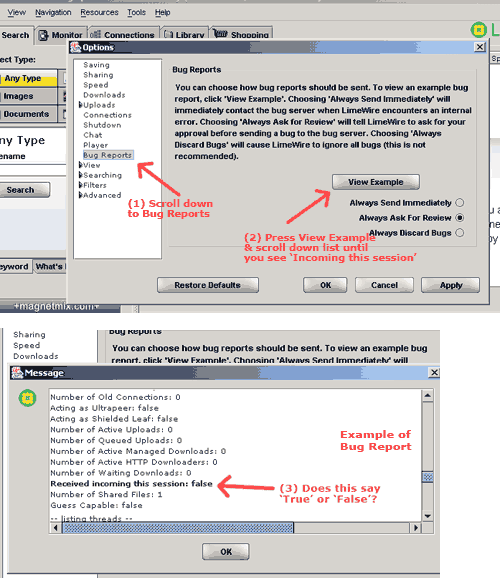
For those of you who are having difficulty connecting do this: When LW is open, click Tools->Options & go to Bug report & click for an example. In the window that appears scroll down to the part that says: "Recieved incoming this session" (about half way down the report.) If it says ‘True’ then LW has no problem with firewalls, but if 'False' it does have a prob.
If you're using Mac OSX then go to LW's Prefs-Bug Report, & for OS9 that's Options-Bug Report. If you have a firewall/router blocking your connection, you'll need to open a port. For the most common firewalls, instructions can be found at the bottom of the following page: http://www.limewire.com/english/content/firewalls.shtml Last edited by Lord of the Rings; October 27th, 2004 at 07:59 AM.
|
|
#401
October 27th, 2004
|
||||
|
||||
|
This is what you need to look for:
Last edited by Lord of the Rings; February 16th, 2008 at 06:44 AM.
|
|
#404
October 27th, 2004
|
||||
|
||||
|
Man, we should close this thread... I mean, do people even read the first post?
__________________
iMac G4 OSX 10.3.9 RAM 256MB LW 4.10.5 Basic ADSL anything from 3 to 8Mbps/around 1024kbps "Raise your can of Beer on high And seal your fate forever Our best years have passed us by The Golden Age Of Leather" -Blue Öyster Cult-
|
|
|
|
 Similar Threads
|
||||
| Thread | Thread Starter | Forum | Replies | Last Post |
| Gprs Connect Unable To Connect Online | khara89 | Connection Problems | 17 | September 9th, 2008 12:44 AM |
| can't connect to limewire, have been able to connect to Bearshare in the past | dancindoll0506 | Connection Problems | 8 | March 28th, 2008 07:00 PM |
| Direct Connect - cant Connect! | Rob_Online | Connection Problems | 12 | December 31st, 2005 08:49 AM |


 Linear Mode

